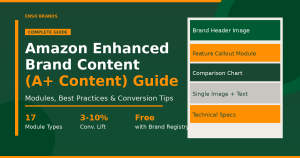
A+ Content is one of the most powerful tools Amazon gives brand-registered sellers. It replaces the plain text product description with a rich, visual layout that shows your product in action, answers buyer questions, and builds brand credibility. The best A+ pages share three qualities: clean design, clear messaging, and a layout that helps shoppers decide faster.
In this post, we look at five real A+ Content examples and break down exactly what makes each one work, so you can apply the same principles to your own listings. If you want to understand the full picture of what A+ Content can do for conversions, read our detailed guide on A+ Content and conversion rate improvement.
What Is Amazon A+ Content?
A+ Content (formerly known as Enhanced Brand Content or EBC) is an upgraded product description feature available to brand-registered sellers on Amazon. It lets you replace the plain text description with a structured layout including lifestyle images, comparison charts, feature breakdowns, infographics, and brand storytelling modules.
A+ Content is available exclusively to sellers enrolled in Amazon Brand Registry. It shows up in the “From the Brand” and “Product Description” sections of a listing, just below the bullet points and above customer reviews.
What you can include:
- High-quality lifestyle images
- Comparison charts across product lines or variations
- Custom layouts with feature callouts
- Detailed feature breakdowns and infographics
- Brand story banners
- Image galleries and product videos (Premium tier)
Regular A+ vs Premium A+ Content
Regular A+ Content is available to all brand-registered sellers. It offers up to 5 modules per page, a maximum content width of 970 pixels, and typically improves conversion rates by 3 to 10%.
Premium A+ Content (also called A++) is invite-only and reserved for top-performing brands. It unlocks up to 7 modules per page including video loops, interactive Q&A, testimonials, and image carousels, at a maximum width of 1464 pixels. Premium A+ can improve conversion rates by up to 15%.
Why Every Brand-Registered Seller Should Use A+ Content
- Higher conversions: shoppers get more information before making a decision, reducing hesitation
- Lower return rates: better-informed buyers make fewer impulse purchases they later regret
- Brand differentiation: a professional A+ page makes your listing stand out in crowded categories
- Mobile-optimized: over 70% of Amazon traffic comes from mobile, and A+ modules are built for it
- No extra cost: A+ Content is free to create and publish for brand-registered sellers
5 Effective Amazon A+ Content Examples
1. Burlybands Hair Ties
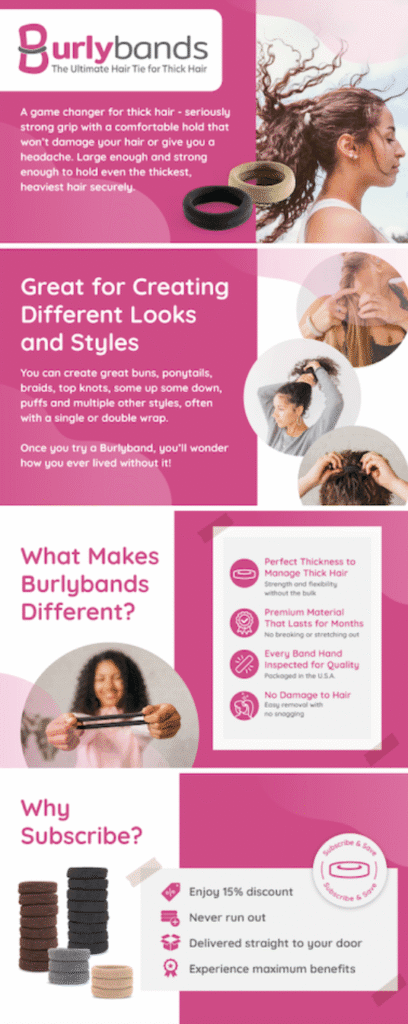
Burlybands uses bold lifestyle images showing their hair ties in action on thick, curly hair. That single creative choice immediately tells the right shopper “this is for me.” Each module highlights a distinct benefit: hold strength, no-snag design, and why their ties outperform standard elastics. The messaging is direct, benefit-focused, and never generic.
What you can learn: Know your buyer’s core frustration and address it visually in the first module. If your product solves a specific problem for a specific type of person, show that context, not just the product.
2. Pepe Nero Granite Mortar and Pestle
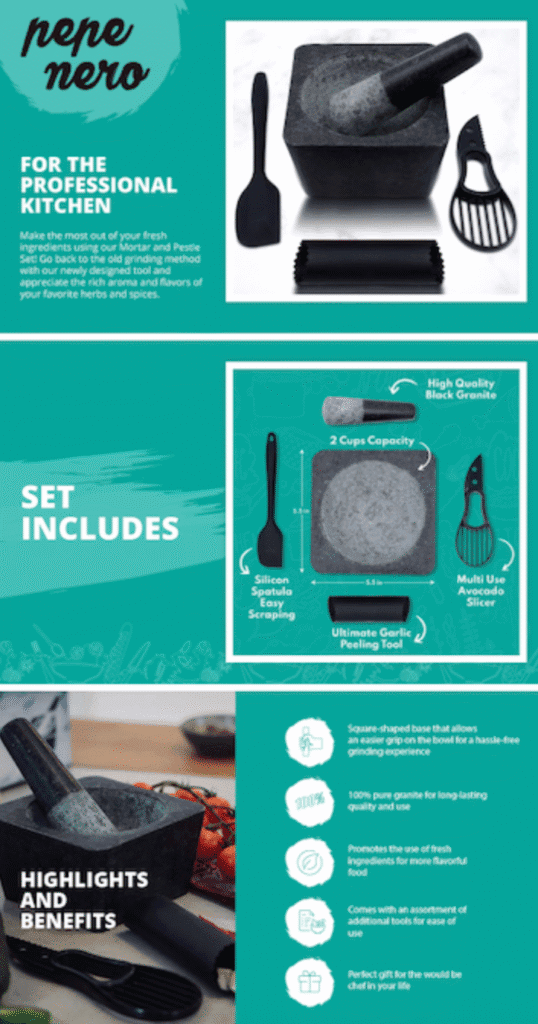
Pepe Nero’s A+ Content features close-up images of the grinding surface and the combination tools included in the set. The layout is clean and minimal with short, focused text. It communicates quality and versatility without overloading the shopper with information. For kitchenware, where shoppers want to see the texture and materials, this approach works extremely well.
What you can learn: If your product has broad appeal and does not need a lot of explanation, less is more. Let high-quality images do the heavy lifting. Short, confident copy next to strong visuals is more persuasive than long descriptions.
3. Travah Diversion Safe Water Bottle
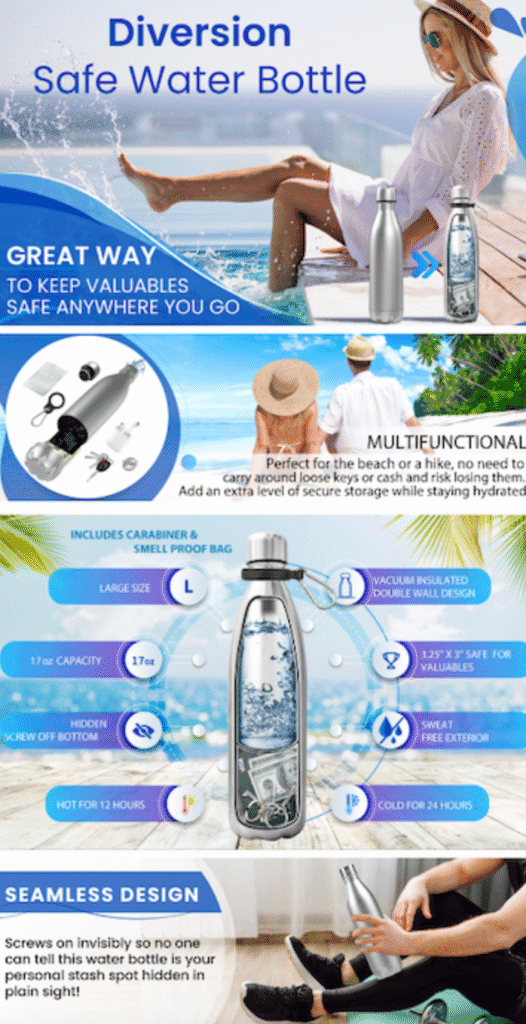
Travah’s A+ Content leads with a cross-section visual that immediately reveals the secret storage compartment. This is the unique selling point that differentiates the product from a standard water bottle, and they lead with it. The layout combines drink temperature control features with the hidden compartment benefit in a single cohesive design. They also include a comparison chart showing their full product line, which helps shoppers find the right size or variant without leaving the page.
What you can learn: If your product has a unique feature that is not obvious from the main image, your A+ Content is the place to show it clearly. Lead with your differentiator. Add a comparison chart if you carry multiple related products as it reduces buyer indecision.
4. Acupoint Massage Ball Set
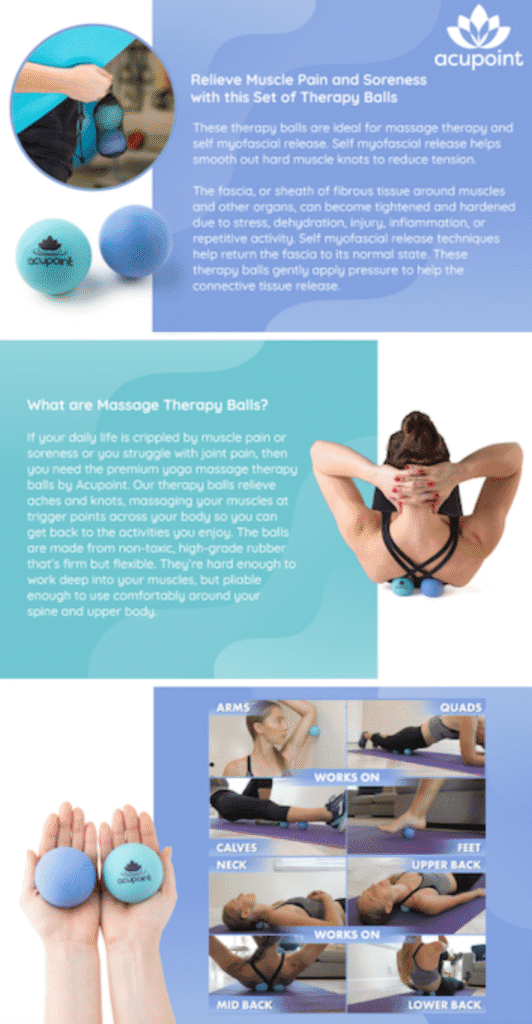
Acupoint’s A+ Content shows the full set together and immediately calls out specific use cases like “neck, back, shoulder” and “trigger-point release.” Shoppers can picture themselves using the product in a specific moment, which makes the purchase feel less abstract. The page also includes a comparison chart of their other sets, helping repeat buyers or undecided shoppers make the right call.
What you can learn: For lifestyle or health products, use cases matter as much as features. Do not just list what the product does. Show the specific situations where it helps. Buyers buy solutions, not objects.
5. Nice Packs Dry Ice Packs
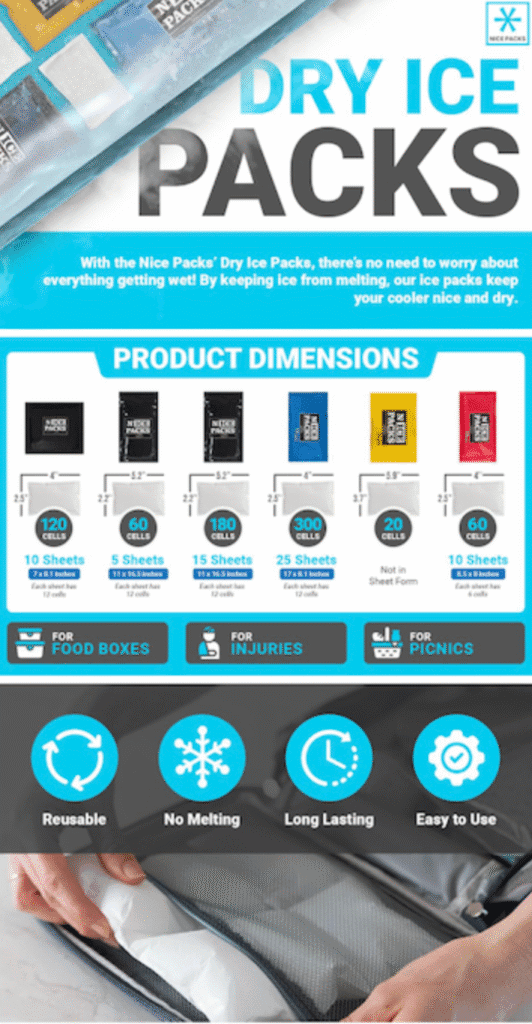
Nice Packs keeps it simple. Clear how-to visuals walk buyers through exactly how to use the ice packs, removing any doubt about whether the product will work for them. They include a size comparison chart. The clean layout and minimal copy make it fast to scan, which is exactly what mobile shoppers need.
What you can learn: If your product requires any assembly or has non-obvious usage, use A+ Content to teach buyers how to use it. Simple instructions presented visually reduce hesitation and return rates at the same time.
What All Five Examples Have in Common
- They show the product in real use, not just on a white background
- They explain why the product matters, not just what it is
- They use visuals, icons, or charts to make information fast to absorb
- They use plain, direct language that does not feel like marketing copy
- All layouts work well on mobile as well as desktop
How to Apply These Principles to Your A+ Content
- Lead with your differentiator. The first module should immediately show what makes your product better or different from everything else in the category.
- Use lifestyle images, not just product shots. Show the product being used in context. If you sell pet products, show a dog using it. If you sell kitchen tools, show someone cooking with it.
- Address the top buyer questions before they ask. Think about what makes shoppers hesitate, then answer those concerns visually within the modules.
- Add a comparison chart if you have multiple products. It reduces indecision and often increases average order value.
- Keep copy short. Every sentence in your A+ Content should earn its place. If it does not help the shopper decide, cut it.
- Maintain brand consistency. Use the same colors, fonts, and tone across all your listings. A unified look builds brand recognition over time.
If you are also working on the rest of your listing, pair your A+ Content improvements with a strong product title optimization and clean listing copy. All three elements work together to drive conversion.
Frequently Asked Questions
How do I get access to A+ Content on Amazon?
You need to be enrolled in Amazon Brand Registry, which requires a registered trademark. Once enrolled, A+ Content is available in Seller Central under the Advertising menu. It is free to create and publish.
How long does A+ Content take to get approved?
Amazon typically reviews and approves A+ Content submissions within 7 business days. You will receive an email notification when it is approved or if changes are needed.
Does A+ Content help with Amazon SEO?
The text within A+ Content modules is not indexed by Amazon’s search algorithm, so it does not directly affect keyword rankings. However, it improves conversion rate, which does signal quality to Amazon’s algorithm and can indirectly support ranking over time.
What is the difference between A+ Content and a Brand Story?
A+ Content replaces the product description section and focuses on product features, benefits, and use cases. The Brand Story module appears above A+ Content and introduces the brand’s mission and values. Both are available to brand-registered sellers and can be used together.
Final Thoughts
Good A+ Content does not just look professional. It drives more sales by answering buyer questions, reducing hesitation, and making your product feel like the obvious choice. The five examples above prove you do not need a huge budget or complex layouts to do this well. You need clarity, strong visuals, and a genuine understanding of who your buyer is and what they care about.
Need help designing A+ Content that converts? Enso Brands creates A+ Content and full listing optimization for private label brands. Talk to our team about making your listings work harder.